
Best Free Lead Capture Plugin for WordPress: Why Gracewell LeadForge Wins
Short answer: if you want the best free lead generation plugin for WordPress, Gracewell LeadForge is a solid pick. It stores every lead in your own WordPress database, emails you the second someone submits the form, and lets you export the whole list to CSV — no subscription, nothing locked behind a paywall.
Every website owner wants the same thing: more leads, less hassle. But most popup plugins get in the way instead of helping — they cost too much, slow the site down, or interrupt visitors before they've read a single line.
So is there a free lead capture plugin for WordPress that's fast, clean, and doesn't annoy people? Yes, actually. That's exactly what Gracewell LeadForge was built for.
Whether you run a blog, a small business site, or a few client sites, LeadForge gives you a simple way to collect emails and enquiries, and it doesn't cost a thing. Below, we'll go through why it's become one of the best free lead generation plugins for WordPress, how it compares to the alternatives, and where it fits best. And if you want the bigger picture on lead generation beyond popups, our lead generation guide is worth a read too.
Why Other Popup Plugins Fall Short
You've probably tried one before — a wall of settings, a confusing dashboard, or a "free" plan that locks the useful bits behind a paywall. Here's the usual pattern:
- Too expensive: premium plans often run $99–$299 a year for basic popup features.
- Too heavy: bloated scripts slow the page down and hurt your search rankings.
- Bad on mobile: full-screen popups on phones push people away fast.
- Too complicated: hours lost to templates and triggers before capturing a single lead.
- Not private: some plugins quietly send lead data to third-party servers.
- No real lead management: collecting emails means little if you can't view or export them.
Put that together and it's no surprise so many sites end up with high bounce rates and barely any leads. That's the gap Gracewell LeadForge fills.
Meet Gracewell LeadForge
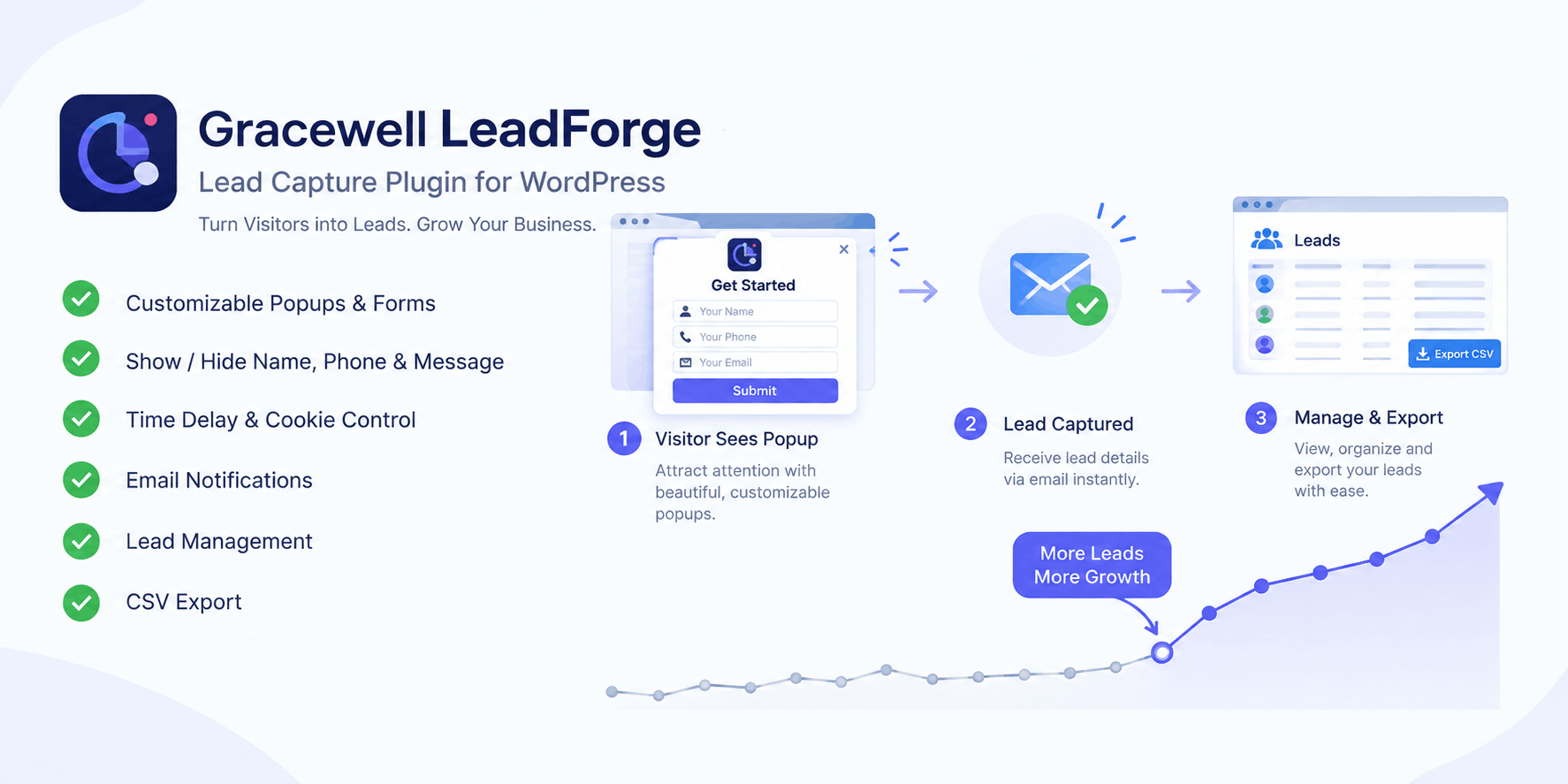
Gracewell LeadForge is a free, lightweight lead capture plugin for WordPress. Instead of trying to do everything, it focuses on one job: showing a smart popup at the right moment and collecting exactly the information you need — nothing more.
Every lead lands in your own WordPress database. You get an email the moment someone fills out the form, and you can export the full list as a CSV whenever you like, all without touching a line of code.
It's built by Gracewell, and the idea behind it is simple: a good lead capture tool shouldn't need a marketing budget to use.
What Makes It Different
There's no shortage of popup plugins out there, so here's what actually sets LeadForge apart:
- Genuinely free: every core feature is included, with no "Pro" tier hiding the useful stuff.
- Fast by design: lightweight code that won't hurt your Core Web Vitals or page speed score.
- Your data, your database: no third-party servers involved — you keep full control.
- Live in minutes: no steep learning curve, and no developer needed.
- Mobile-first: looks and works the same on a phone as it does on a desktop.
Everything It Can Do
Here's what's included in the free version — no asterisks attached:
Easy Setup
Get the popup live in minutes through a simple settings panel — no coding needed.
Customizable Form Fields
Turn Name, Phone, Email, and Message fields on or off based on what you actually need.
Time Delay Trigger
Show the popup only after a visitor has engaged with the page — it helps conversions a lot.
Cookie Suppression
Stops the popup from reappearing for returning visitors, so it doesn't wear out its welcome.
Email Notifications
Get notified the moment a new lead comes in, so you're not stuck checking a dashboard.
Lead Management Dashboard
Names, emails, phone numbers, and timestamps, all in one organized table.
CSV Export
Download every lead in one click and drop it into any CRM or email tool.
Mobile Responsive Design
Works cleanly across desktop, tablet, and mobile with zero extra setup.
Customizable Colors
Match the popup to your brand palette straight from the settings page.
Professional Design
A clean, modern look out of the box — no designer needed.
Who It's Best For
LeadForge works well across all kinds of sites. A few places it tends to shine:
- Small businesses: collect enquiries and quote requests without a pricey CRM.
- Bloggers: grow your newsletter by catching engaged readers at the right moment.
- Service providers: gather detailed enquiries using the Name, Phone, and Message fields together.
- E-commerce stores: capture emails for promotions and abandoned-cart follow-ups.
- Agencies: roll it out across client sites fast, and use CSV export for easy reporting.
How It Stacks Up
Here's an honest side-by-side against the popup plugins people usually compare it to:
| Feature | Gracewell LeadForge (Free) | OptinMonster (Paid) | Popup Maker (Freemium) |
|---|---|---|---|
| Cost | 100% Free | From $9/mo | Free + Paid Add-ons |
| Time Delay Trigger | Yes | Yes | Yes |
| Cookie Suppression | Yes | Yes | Paid Only |
| Lead Database | Yes (WP DB) | 3rd Party | Paid Only |
| CSV Export | Yes | Paid Only | Paid Only |
| Email Notifications | Yes | Yes | Paid Only |
| Mobile Responsive | Yes | Yes | Yes |
| Custom Form Fields | Yes | Yes | Paid Only |
| Data Stored Locally | Yes | No | No |
| No Third-Party Sharing | Yes | No | No |
| Setup Time | Under 5 Minutes | 30–60 Minutes | 15–30 Minutes |
Line by line, the pattern holds: for anyone who wants clean, private, zero-cost lead capture, LeadForge comes out ahead on nearly every category that actually matters.
Is Your Data Safe?
Privacy wasn't an afterthought here — it was part of the plan from day one.
- Stored locally: every lead sits inside your own WordPress database.
- Admin-only access: only logged-in site administrators can see lead data.
- No third-party sharing: unlike a lot of competing plugins, nothing syncs to an outside server.
- You own it: export, delete, or migrate your leads whenever you want.
- Privacy-friendly: a good fit if GDPR-style data ownership matters to your business.
The Short Version
- Gracewell LeadForge is completely free — no hidden paywalls.
- Comes with time-delay triggers, cookie suppression, and mobile-first design out of the box.
- Every lead stays in your own WordPress database, never shared with third parties.
- Email alerts plus one-click CSV export make follow-up easy.
- Set up takes under 5 minutes, no coding needed.
- Works well for small businesses, bloggers, service providers, e-commerce stores, and agencies.
Download Gracewell LeadForge Free
Start capturing more leads today. No credit card, no subscription, no compromise.
Download NowCommon Questions
Is Gracewell LeadForge completely free?
How do I install it?
Where are the captured leads stored?
Can I customize the popup fields?
Does it work well on mobile?
How does the time-delay trigger work?
What is cookie suppression?
Can I export my leads?
Learn More
See full features, documentation, and support resources for Gracewell LeadForge.
Visit Official WebsiteFinal Thoughts
Lead generation doesn't need to be expensive or complicated. Gracewell LeadForge proves the best free lead capture plugin for WordPress can still be lightweight, private, and genuinely useful.
While paid tools charge for things like CSV export and a lead dashboard, LeadForge includes all of that for free — and keeps your data exactly where it belongs, inside your own WordPress database. For more on the strategy side, our lead generation guide is a good next step.
Install it, set it up in under 5 minutes, and start capturing leads the smart way — for free.
Download Gracewell LeadForge Free