

Best WordPress Malware Scanner : Why Wordfence Leads the Pack
WordPress powers millions of websites worldwide, making it one of the biggest targets for hackers, malware injections, brute-force attacks, and phishing campaigns. If your website gets infected, you could lose traffic, customer trust, SEO rankings, and even revenue overnight. That's why choosing the right WordPress malware scanner is critical.
Among all the security plugins available today, Wordfence remains one of the most trusted and widely used solutions for protecting WordPress websites against modern cyber threats. In this guide, we'll explore how Wordfence works, its key features, pricing, and why it continues to dominate WordPress security in 2026.
What Is Wordfence?
Wordfence is a powerful WordPress security plugin that provides malware scanning, a web application firewall (WAF), login security, real-time threat detection, file integrity monitoring, and brute-force protection — all designed specifically for WordPress.
Why WordPress Websites Need Malware Protection
Cybercriminals constantly scan websites for vulnerabilities. Even small blogs and local business websites are targeted automatically using bots. A hacked WordPress site can lead to:
- Google blacklisting your domain
- Loss of SEO rankings and organic traffic
- Data theft and customer information leaks
- Redirect spam and phishing pages
- Cryptocurrency mining malware running silently
- Complete website downtime
Without a dedicated WordPress malware scanner, infections can remain hidden for weeks or even months.
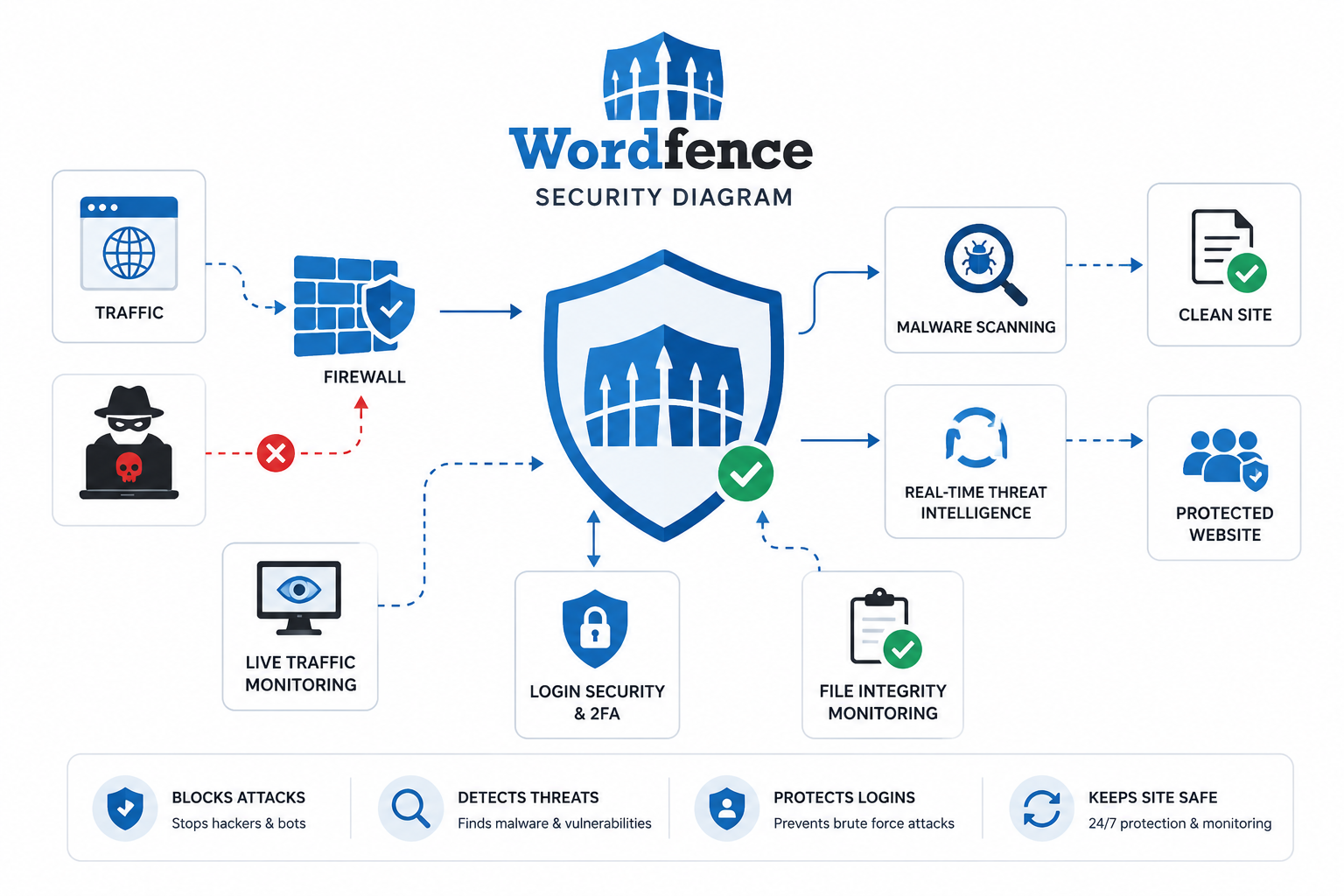
Key Features of Wordfence
Malware Scanner
Checks core WordPress files, themes, plugins, and database for infections, backdoors, and malicious code.
Web Application Firewall
Blocks SQL injection, XSS attacks, malicious bots, and exploit attempts directly on your server.
Login Security
Two-factor authentication, CAPTCHA, and brute-force protection to lock out unauthorized users.
Live Traffic Monitor
View real-time visitors, blocked attackers, failed logins, and suspicious bots from your dashboard.
How the Wordfence Malware Scanner Works
The WordPress malware scanner runs automated checks across your website files and database. It compares your files against the official WordPress repository to detect any tampering instantly. It identifies:
- Modified core WordPress files
- Hidden backdoors and shell scripts
- SEO spam injections and malicious redirects
- Phishing scripts embedded in themes or plugins
- Obfuscated PHP code designed to evade detection
Once threats are detected, Wordfence provides clear recommended actions to clean infected files — right from your WordPress dashboard.
Wordfence Firewall Explained
The Wordfence firewall is designed to stop attacks before they execute. Unlike cloud-based firewalls, Wordfence operates directly on your server for deep WordPress integration. It protects against:
- Remote code execution attacks
- File inclusion vulnerabilities
- XML-RPC abuse (a common WordPress attack vector)
- Malicious automated bots
- Zero-day vulnerability exploitation
Real-Time Threat Intelligence
Premium Wordfence users receive continuously updated malware signatures, real-time IP blocklists, new firewall rules, and emerging threat intelligence. This is especially important because cyber threats evolve constantly — new attack vectors appear daily, and a stale malware scanner is a vulnerable one.
Login & Brute Force Protection
Wordfence dramatically reduces unauthorized login attempts using two-factor authentication (2FA), CAPTCHA protection, brute-force attack prevention, and login attempt limiting. For WooCommerce stores and membership sites, this layer of protection is essential for safeguarding customer accounts.
Wordfence Free vs Premium
Wordfence offers both a free and a premium version. Here's a full feature comparison:
| Feature | Free Version | Premium Version |
|---|---|---|
| Malware Scanner | ✔ Yes | ✔ Yes |
| Web Application Firewall | ✔ Yes | ✔ Yes |
| Real-Time Firewall Updates | ⚡ Delayed (30 days) | ✔ Instant |
| Real-Time Malware Signatures | ⚡ Delayed (30 days) | ✔ Instant |
| Country Blocking | ✖ No | ✔ Yes |
| Live IP Blocklist | ✖ No | ✔ Yes |
| Two-Factor Authentication | ✔ Yes | ✔ Yes |
| Premium Support | ✖ No | ✔ Yes |
The free version is excellent for beginners and personal blogs. Premium is better suited for business websites, eCommerce stores, and agencies managing multiple client sites.
Wordfence vs Sucuri
Many users compare Wordfence with Sucuri because both are popular WordPress security solutions. Here's a quick breakdown:
✅ Wordfence Strengths
- Deep WordPress integration
- Detailed malware scanning inside the dashboard
- Better visibility into WordPress-specific threats
- Strong login security features
- Powerful free version available
⚡ Sucuri Strengths
- Cloud-based firewall (DNS level)
- CDN integration for faster performance
- Faster DDoS mitigation at scale
- External website monitoring
- Malware removal service included
For most WordPress users, Wordfence offers more control, better malware scanning capabilities, and stronger WordPress-specific protection directly inside the dashboard.
How to Install Wordfence
Installing the Wordfence WordPress malware scanner is straightforward:
- Log in to your WordPress admin dashboard
- Go to Plugins → Add New
- Search for "Wordfence Security"
- Click Install Now, then Activate
- Follow the setup wizard and enter your licence key (if premium)
- Run the initial security scan from the Wordfence menu
After installation, optimize the firewall using the built-in Extended Protection mode for maximum coverage.
Best Wordfence Settings for Maximum Security
To get the most out of your WordPress malware scanner, enable these settings inside Wordfence:
- Two-Factor Authentication (2FA) — for all admin accounts
- Automatic Scheduled Scans — daily or weekly depending on site traffic
- Rate Limiting — to throttle aggressive bots and crawlers
- Brute-Force Protection — limit failed login attempts and lockout durations
- Email Security Alerts — for critical file changes and new admin users
- Firewall Optimization Mode — load Wordfence before WordPress for better coverage
Also keep all plugins and themes updated regularly — outdated software is the #1 entry point for attackers.
Common Malware Threats in WordPress
WordPress websites commonly face the following threats that a malware scanner like Wordfence actively detects:
- Pharma hack spam — hidden links to pharmaceutical sites injected into your pages
- SEO spam redirects — visitors redirected to spam or adult websites
- Fake admin users — rogue administrators added to your WordPress database
- Backdoor scripts — hidden PHP files allowing persistent attacker access
- Cryptocurrency miners — scripts using your visitors' browsers to mine crypto
- File injection attacks — malicious code appended to theme or plugin files
Performance & Server Impact
Because Wordfence runs directly on your server (rather than in the cloud), it can increase CPU usage during active scans — particularly on shared hosting plans with limited resources. However, modern managed WordPress hosting providers handle Wordfence efficiently. For larger or high-traffic sites, you can optimize scan frequency and schedule scans during low-traffic hours to minimize any impact.
Pros and Cons of Wordfence
✅ Pros
- Excellent WordPress-specific malware detection
- Strong and customizable firewall
- Beginner-friendly setup and interface
- Powerful free version with core features
- Real-time traffic monitoring and logs
- Easy native WordPress dashboard integration
- Active development and frequent updates
⚠️ Cons
- Can increase CPU usage on budget shared hosting
- Real-time threat updates require the premium plan
- Firewall operates at application level (not DNS level)
- Free support limited to community forums
Final Verdict: Is Wordfence Worth It in 2026?
Yes — Wordfence remains the best WordPress malware scanner available in 2026. It combines malware scanning, firewall protection, login security, and real-time monitoring into a single, easy-to-manage platform. Whether you run a personal blog, a WooCommerce store, or a multi-site agency network, Wordfence provides the security coverage modern WordPress sites demand.
Get Wordfence →